

The Threat at Your Fingertips
Ever wondered how a single careless click could compromise your company’s most sensitive data? In 2026, this scenario is alarmingly real. Magecart-style client-side injection attacks quietly siphon payment details from users’ browsers, hidden in malicious JavaScript embedded on e-commerce sites. At the same time, AI-driven phishing campaigns have surged, with generative tools creating compelling fake interfaces at scale, contributing to a 1,265% rise in phishing emails globally. The financial impact is staggering: average breach costs now reach $4.88 million per incident.
Client-side attacks are different from server-side breaches. Instead of targeting backend servers, APIs, or databases, attackers focus on the user’s device or browser, the very place where trust is assumed. While server-side defenses guard infrastructure, client-side attacks exploit the environment where users interact with content in real time.
TL;DR – Key Takeaways
- Definition: Exploits that manipulate code or vulnerabilities in the user’s browser or device.
- Detection: Often invisible to server logs and traditional monitoring.
- Prevention: Requires runtime visibility, secure coding practices, and CSP/SRI implementation.
Nearly half of all web traffic today comes from automated scripts or bots, which expands the hidden surface area for client-side attacks. In 2026, the frontline of cybersecurity is no longer just the server. It lives in the browser.
What are Client-Side Attacks?

Client-side attacks are breaches that execute directly in a user’s browser or device, exploiting vulnerabilities in HTML, JavaScript, browser extensions, or embedded third-party scripts. Unlike server-side attacks, which target backend systems, client-side exploits turn trusted web pages into active threats, stealing data, hijacking sessions, or manipulating user actions in real time.
These attacks are often invisible. Modern browsers, APIs, and content delivery setups create a complex environment where malicious scripts can execute silently. Hidden inside analytics tools, marketing pixels, or plugins, these exploits bypass server logs entirely, leaving traditional detection methods blind.
Aspect | Client-Side Attacks | Server-Side Attacks |
Execution Context | Browser/device runtime | Server environment |
Visibility | Hidden from server logs | Logged and traceable |
Primary Targets | Users, sessions, cookies, local storage | Databases, APIs, backend services |
Detection Difficulty | High. Often invisible | Moderate. Visible in logs |
In 2026, the threat has evolved beyond classic XSS or clickjacking. AI-generated phishing payloads, dependency-chain injections in open-source libraries, and low-code botkits that autonomously distribute malicious scripts are now standard. Every embedded script, plugin, or tracking pixel is a potential entry point. The browser has become the new battlefield, and the stakes for users and organizations have never been higher.
Also Read:
- What are Bot Attacks?
- What are Bug Bounty Programs?
- The Ultimate Guide to Coupon Scraping (2026): How Attackers Exploit Promo Codes – and How to Stop Them
Anatomy & Lifecycle of a Client-Side Attack
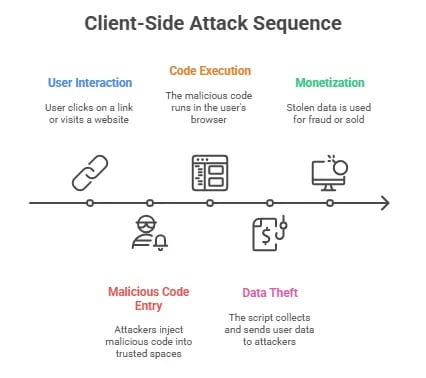
Most client-side attacks don’t start with a hacker breaking into your servers; they begin with a click.
A user visits a website, opens a link in an email, or loads a shopping page with a third-party plugin. Everything looks normal. But behind the scenes, a hidden script begins to run inside their browser.
How the attack unfolds
- Entry: Attackers sneak malicious code into trusted spaces – like ad networks, analytics tools, or vulnerable forms. Every embedded pixel or widget becomes a possible doorway.
- Execution: Once the user opens the page, the code runs quietly in their browser. It doesn’t touch your server, so it rarely shows up in logs.
- Data Theft / Hijack: The script starts collecting what it sees – cookies, login details, payment info, session tokens – and sends it back to the attacker.
- Monetization: The stolen data is then sold, used for fraud, or exploited to launch larger attacks.
The shadow code problem
Modern websites rely on dozens of external scripts. Most are safe, but a few operate without monitoring. This is shadow code.
In 2018, Newegg, a leading online electronics retailer, learned this the hard way. Magecart attackers injected just 15 lines of malicious JavaScript into Newegg’s checkout page. For 32 days, that code quietly skimmed customers’ credit card data and sent it to a fake domain. The site looked perfectly normal. The servers were clean. But the browser wasn’t.
The Newegg breach became a landmark example of how invisible browser-side code can break trust, steal sensitive data, and remain undetected for weeks – even on high-traffic, well-secured platforms.
Attacker vs Defender
- The attacker’s advantage: they hide where traditional tools can’t see – inside the user’s browser.
- The defender’s challenge: detecting changes in real time. Runtime monitoring, strict Content Security Policies (CSP), and Subresource Integrity (SRI) checks are now essential.
How users unknowingly help
Sometimes, it’s not advanced malware. It’s a simple behavior.
Clicking suspicious links and ignoring browser warnings, using outdated extensions. Attackers count on these minor lapses to complete the chain.
In short:
Client-side attacks exploit trust – the trust between websites, scripts, and users.
They happen silently in the browser, not the backend. To stop them, visibility must shift to where the attack lives.
Types of Client-Side Attacks

Client-side attacks exploit vulnerabilities in browsers and devices in distinct ways. Understanding each type helps organizations anticipate risks and implement targeted defenses.
1. Cross-Site Scripting (XSS) & Client-Side Code Injection
What it is: Attackers inject malicious scripts into otherwise trusted web pages, which then execute in the user’s browser.
How it happens: A simple input field, like a comment box or feedback form, accepts unfiltered HTML or JavaScript. When rendered, it executes malicious code.
Impact: Session hijacking, credential theft, account takeovers, or even malware installation.
2026 Shift: Attackers now use AI-generated payloads and supply-chain-level XSS through third-party libraries, making manual detection nearly impossible.
Detection Complexity: High, blends with legitimate code.
Why it’s hard to detect: It blends seamlessly with legitimate client-side code, a script among scripts.
2. Clickjacking

What it is: A user is tricked into clicking something they didn’t intend to, usually through a deceptive UI overlay.
How it happens: A transparent iframe is placed over a visible button. The user believes they’re “liking” a post, but actually approve a payment or share personal info.
Impact: Unauthorized actions, financial losses, and privacy breaches.
2026 Shift: Attackers are exploiting mobile interfaces and social engineering overlays that mimic platform-native prompts.
Detection Complexity: Moderate, subtle visual cues.
3. Drive-By Downloads

What it is: Malware is downloaded automatically when a user visits a compromised website.
How it happens: Hidden exploit kits on a webpage silently trigger downloads and installations.
Impact: Ransomware, botnet infection, or whole device compromise.
2026 Shift: Emergence of multi-platform payloads that target both mobile and desktop browsers.
Detection Complexity: High, often uses zero-day vulnerabilities.
Why it’s dangerous: It needs no click, no consent – just a visit.
4. Man-in-the-Browser (MitB)

What it is: Malware that lives inside the browser itself, intercepting and altering traffic in real time.
How it happens: Once infected, a browser extension or malicious script modifies transactions before they are submitted.
Example: Banking trojans change payment details right before they reach the bank’s servers.
2026 Shift: Cross-platform MitB attacks that can operate across Chromium and mobile browser ecosystems.
Detection Complexity: Very high, operates within trusted browser processes.
Why defenders struggle: It operates inside trusted browser processes, bypassing traditional endpoint or network detection.
5. Phishing & Fake Interfaces
What it is: Deceptive pages or overlays that mimic legitimate websites or login prompts.
How it happens: AI-generated pages replicate real interfaces down to fonts and favicon details.
Impact: Credential theft and identity fraud.
2026 Shift: LLM-powered phishing and deepfake login interfaces that even fool seasoned users.
Detection Complexity: Moderate, AI makes detection challenging.
6. Session Hijacking

What it is: Attackers steal or manipulate session tokens to impersonate users.
How it happens: A successful XSS or compromised browser extension captures active session cookies.
Impact: Persistent access to user accounts, even after password resets.
2026 Shift: Automated session theft tools now leverage malicious extensions to harvest tokens in bulk.
Detection Complexity: High, often invisible to server-side monitoring.
7. Cross-Site Request Forgery (CSRF)
What it is: Malicious scripts trick the browser into making unauthorized requests on behalf of an authenticated user.
How it happens: A user clicks a crafted link or loads a page that sends a hidden request, like changing account settings or transferring funds.
Impact: Unauthorized actions, silent data manipulation.
2026 Shift: Embedded third-party widgets increasingly trigger CSRF attacks, expanding the threat beyond traditional forms.
Detection Complexity: Moderate, relies on user authentication state.
8. Client-Side Template Injection
What it is: Exploiting client-side template engines (used in JS frameworks) to execute arbitrary code.
How it happens: Unsanitized user input is directly injected into client-side templates.
Impact: Data theft, arbitrary code execution, or complete site defacement.
2026 Shift: New exploits target low-code platforms and popular frameworks like Vue and React-based renderers.
Detection Complexity: High, template logic is often complex and poorly monitored.
Comparison Table
Attack Type | How It Works | Consequences | Detection Complexity | 2026 Trend Note |
XSS & Code Injection | Injects script into the page | Credential theft, malware | High | AI payloads, supply chain |
Clickjacking | UI overlays trick clicks | Unauthorized actions | Moderate | Mobile overlays |
Drive-By Downloads | Auto-download malware | Device compromise | High | Multi-platform |
MitB | Malware manipulates the browser | Financial fraud | Very high | Cross-platform |
Phishing/Fake Interfaces | Mimics legit sites | Credential theft | Moderate | LLM/deepfake |
Session Hijacking | Steals session tokens | Account takeover | High | Extension abuse |
CSRF | Tricks the browser into making requests | Data modification | Moderate | Widget-based |
Template Injection | Abuses client templates | Code execution | High | JS/low-code |
From clickjacking to MitB, every attack above highlights a crucial reality: the browser is now the new battlefield.
Each vector exploits a different layer of trust – between user and interface, site and script, or session and server.
Tip: Protect against client-side injection attacks using Content Security Policy (CSP) and Subresource Integrity (SRI).
Advanced Attack Techniques

If traditional client-side attacks exploit browser trust, modern ones rewrite how browsers behave.
In 2026, we’re no longer talking about rogue scripts hidden in forms or pop-ups. We’re talking about precision-engineered payloads that bend browser logic itself.
These advanced techniques don’t just steal data. They subvert how your site and browser communicate.
Let’s break down three of the most concerning ones.
1. Client-Side Desync Attacks
What they do: Manipulate how a browser synchronizes its communication with a server.
How they work:
- In normal conditions, browsers and servers exchange data in a predictable sequence.
- Attackers inject crafted requests that desynchronize this process, merging malicious payloads into regular traffic.
- Unlike traditional server-side desyncs, these attacks occur entirely in the client’s browser, so even single-server setups are not immune.
Impact: Cache poisoning, open redirects, cookie theft, and even new pathways for XSS attacks.
Flow example:
User visits malicious site → crafted request blends with valid session → server misinterprets it → unintended actions execute. |
2. XSS + Prototype Pollution: A Dangerous Combination
Why this pairing matters: On their own, XSS and Prototype Pollution are serious. Combined, they can completely corrupt browser logic.
How it works:
- XSS injects executable code.
- Prototype pollution allows attackers to manipulate core JavaScript objects, redefining how the browser interprets subsequent data.
- Together, they bypass validation, alter application state, and persist data theft long after the page is closed.
Impact: Persistent access, credential theft, and stealthy manipulation of user actions, often without tripping any alarms.
3. Whitebox Attacks & Client-Side Logic Manipulation
What they are: Attacks that leverage deep knowledge of your application’s codebase, using reverse engineering or debugging tools to map out its internal logic.
How they work:
- Attackers analyze the client-side JavaScript bundle to understand business logic and validation rules.
- They then craft payloads that override security checks or manipulate app state in real time.
- When combined with Prototype Pollution, this creates a stealth attack that can execute arbitrary code directly in the browser.
Impact: Tampered transactions, bypassed authentication flows, and total compromise of session integrity.
Why These Techniques Matter
These advanced methods represent a shift from data theft to logic manipulation.
Attackers are no longer just looking to steal credentials. They’re trying to rewrite how browsers interpret trust.
This means traditional server logs and WAFs can’t detect these attacks. Detection must now move inside the browser to track runtime behavior, validate third-party scripts, and detect anomalies in real time.
Mobile-Specific Threats
While desktop browsers have evolved with stronger security policies, mobile browsers are the new soft targets.
Attackers are adapting: exploiting how touch interfaces, lightweight browsers, and embedded webviews behave differently from full desktop environments.
Key Mobile Vulnerabilities
- Weak plugin and extension controls: Malicious extensions can bypass permission models.
- Insecure ad networks: Pop-ups and overlays deliver drive-by downloads directly into mobile browsers.
- Weak cookie handling: Inconsistent session isolation across apps makes session hijacking easier.
Mobile vs Desktop: A Security Gap
Aspect | Desktop Browsers | Mobile Browsers |
CSP/SRI Enforcement | Usually strict | Often partial or inconsistent |
User Interface | Clear visual cues | Touch-based; hides clickjacking |
Sandboxing | Strong and standardized | Varies by OS and app container |
Extension Control | Moderated and permissioned | Looser, sometimes OS-dependent |
Browser vs App Attacks
- Browser-focused: Exploit session management, cookies, and web content directly.
- App-focused: Target embedded WebViews, insecure local storage, or inter-app communications.
Why Mobile Phishing Is Surging
AI-generated phishing pages, fake login overlays, and deepfake pop-ups now appear seamlessly within mobile browsers, where small screens make scrutiny harder.
A convincing overlay can look indistinguishable from a legitimate banking app.
The Takeaway
Client-side attacks are evolving into multi-layered ecosystems – spanning browsers, mobile apps, and third-party code.
Security teams can no longer monitor servers; they must instrument the browser itself. Real-time script monitoring, behavioral analytics, and mobile-specific controls are now non-negotiable for organizations serious about defense.
The Cost of Client-Side Breaches
Client-side attacks in 2026 aren’t just technical annoyances. They strike where it hurts most: finances, reputation, and compliance.
Financial Fallout
- Average cost per breach: $4.4 million (IBM Security).
- Sophisticated exploits like Magecart can drive losses even higher, especially when attackers leverage supply chain vulnerabilities or advanced evasion techniques.
A Recent Incident: Magecart March 2025
- Attackers injected malicious JavaScript into e-commerce checkout pages via third-party analytics scripts.
- The script mimicked legitimate payment forms (e.g., Stripe) and silently harvested credit card data from thousands of customers.
- Consequences included a Google blocklisting, a sharp drop in traffic, negative press, and class-action lawsuits.
- Highlight: The server appeared clean, and all activity happened in the browser.
Liked this case study? Also check out ‘Learnings from the Optus Data Breach: 10 API Lessons’.
Regulatory Pressure
- GDPR: fines up to 4% of global turnover for inadequate protection.
- PCI-DSS 4.0 mandates client-side monitoring and third-party script governance.
- RBI (India): requires fast breach disclosure and remediation.
- Non-compliance isn’t just costly. It erodes trust and permanently damages brand credibility.
Detection Challenges
- Average time to detect and contain: at least 100 days.
- During this window, attackers can steal data, hijack sessions, and exploit user trust.
- As CISOs famously say:
“You can’t protect what you can’t see.”
Key Takeaway
Client-side attacks are silent, invisible, and dangerous. They blur the line between technical vulnerabilities and business risk, making runtime visibility, proactive monitoring, and mitigation essential for survival in the digital economy.
Detecting Client-Side Attacks: Seeing What’s Invisible
If “The Cost of Client-Side Breaches” showed you how damaging attacks can be, the next question is: how do you spot them before it’s too late? The challenge is that client-side attacks live in the browser, not on your servers, so traditional logs often miss them entirely.
Early Warning Signs
Subtle browser-level anomalies are often the first hint of trouble:
- Unexpected redirects to unfamiliar domains
- Pop-ups or overlays that mimic trusted interfaces
- Slow site performance or unexplained crashes
- Suddenly, unusual changes in browser extension behavior
These signs might seem minor, but they can indicate scripts silently stealing credentials, hijacking sessions, or injecting malware.
Third-Party Dependencies: Hidden Risk
Even scripts from trusted sources, such as CDNs, analytics tools, and ad networks, can become attack vectors. Modern client-side breaches often exploit these external dependencies, making comprehensive visibility across all browser-loaded scripts critical. You can no longer monitor just your internal code.
Runtime Monitoring: The Gold Standard
Proactive detection requires tools that operate inside the browser, in real time:
- Track script execution and origins
- Monitor network requests as they happen.
- Detect DOM changes and verify session integrity
A modern detection dashboard visualizes:
- Active scripts and their sources
- Real-time alerts for suspicious behavior
- Automated response workflows for preliminary containment
By combining telemetry, behavioral analytics, and threat intelligence, security teams can identify malicious payloads or session hijacks before severe damage occurs.
Key Principle: Visibility Equals Control
As we saw with the Magecart breach, attacks can silently steal massive amounts of data while the server looks clean. You can’t stop what you can’t see – client-side threats demand a proactive, browser-focused approach.
Prevention Strategies & Best Practices: Building a Layered Defense

Stopping client-side attacks isn’t about a single magic tool. It’s about layers of defense, each reinforcing the other. Think of it as a pyramid: at the base, you have strong, secure code; higher up, user awareness and runtime monitoring act as the shield catching anything that slips through.
Secure Coding & Framework Guidance
Start with your foundation: the code itself. Every input should be validated, every output sanitized, and built-in protections in frameworks like Angular and React should be fully leveraged. Avoid unsafe JavaScript functions and treat third-party scripts cautiously. Even minor oversights here can open doors to injection attacks.
Content Security Policy (CSP) & Subresource Integrity (SRI)
CSP acts as a bouncer for your browser, automatically blocking unauthorized scripts. SRI ensures third-party code hasn’t been tampered with by verifying its cryptographic hash before execution. Together, these tools neutralize many attacks before they even start.
Software Updates & Dependency Management
Outdated plugins and libraries are like unlocked windows for attackers. Regular updates, automated vulnerability scans, and removing unused dependencies shrink your attack surface and keep attackers guessing.
Browser Security Features & Sandboxing
Modern browsers offer sandboxed iframes, strict cookie policies (SameSite, HttpOnly), and anti-phishing tools. Encourage users to stay up to date, turn off unnecessary extensions, and take full advantage of these built-in defenses.
User Education & Awareness
Even the strongest technical defenses can be bypassed by a careless click. Train users to spot phishing attempts, suspicious overlays, and fake login screens. Awareness is the layer that stops attacks before they reach the code.
Multi-Factor Authentication (MFA)
If credentials are stolen, MFA acts as a last line of defense. Even a successful client-side breach can’t grant attackers access if accounts are protected with strong multi-factor verification.
Runtime Monitoring
The final layer: real-time visibility. By continuously tracking script execution, DOM changes, and network requests, tools can detect and block malicious activity as it happens, bridging the gap between secure code and user behavior.
To get downloadable & enforceable assets from AppSentinels, visit:
- API Security in Action PDF: The Guided Workbook Every CISO Needs in 2026
- API Audit Checklist: The Definitive Guide to Securing APIs & Preventing Breaches in 2026
Protecting Against Client-Side Injection Attacks
- Enforce CSP and SRI consistently
- Sanitize all user input before rendering.
- Audit third-party dependencies and shadow code
- Conduct regular penetration testing of client-side scripts
2026-Specific Tips
- Deploy AI-driven phishing detection to catch LLM-generated attacks
- Monitor low-code/no-code scripts for hidden vulnerabilities.
- Secure Web3 wallets and extensions, increasingly targeted by attackers
By combining strong coding practices, proactive monitoring, and user awareness, organizations can build a resilient, multi-layered shield that adapts to the evolving world of client-side threats.
AppSentinels Framework for Client-Side Security

Even with layered defenses, client-side threats thrive in blind spots – the scripts and dependencies running silently in the browser. AppSentinels addresses this with a three-pillar approach: Visibility, Governance, and Intelligence.
Visibility: Automatically discover all scripts and APIs: shadow, orphaned, or low-code – so nothing goes unmonitored.
Governance: Enforce security policies in real time. Autonomous agents test workflows, business logic, and dependencies, ensuring only authorized scripts run while maintaining compliance.
Intelligence: AI-driven analytics detect anomalies, zero-day exploits, and suspicious behavior before they escalate. Browser telemetry is combined with global threat intelligence for proactive protection.
Organizations using this framework report a 99% reduction in client-side vulnerabilities and significantly faster breach detection, enabling them to secure billions of API calls monthly without impacting performance.
In short, it transforms client-side security from reactive to preemptive, protecting the very environment where modern attacks occur.
Frequently Asked Questions (FAQs) on Client-Side Attacks
1. What is the most common client-side attack in 2026?
Cross-Site Scripting (XSS) remains the most common client-side attack in 2026. It allows attackers to inject malicious scripts into trusted web pages, stealing cookies, session tokens, and sensitive data from users.
2. What are the early warning signs of a client-side breach?
Look for abnormal script activity, sudden redirects, unauthorized pop-ups, or changes in site behavior. Tools like AppSentinels’s runtime monitoring can detect these anomalies in real time before data exfiltration occurs.
3. How can small businesses protect their browser-based assets?
Adopt layered defenses: enforce a strict Content Security Policy (CSP), use HTTPS everywhere, update third-party libraries, and monitor runtime behavior. Affordable, lightweight solutions like AppSentinels’s browser agents can help even small teams stay secure.
4. How does runtime monitoring help prevent client-side attacks?
Runtime monitoring tracks every script running in a user’s browser and detects anomalies such as DOM tampering, injection attempts, and data leaks as they happen. This visibility is key to early detection and prevention.
5. Can multi-factor authentication (MFA) stop client-side attacks?
MFA can’t prevent an attack itself, but it can limit its damage. Even if attackers steal credentials via a malicious script, MFA adds a second verification layer that blocks unauthorized logins.
6. What are the emerging client-side attack trends in 2026?
AI-generated phishing pages, malicious browser extensions, and low-code/no-code script abuse are on the rise. Web3 wallets and decentralized apps are also becoming prime targets due to poor client-side validation.
7. What are OWASP client-side attacks?
The OWASP (Open Web Application Security Project) highlights client-side threats like XSS, DOM-based injection, and broken access control. Their updated 2025 list emphasizes supply chain and third-party script risks.
8. What does PortSwigger’s research reveal about client-side exploits?
PortSwigger’s 2025 research shows that most client-side attacks stem from unvalidated user input and weak sandboxing. The report reinforces the need for active runtime protection and dependency audits.
9. How are client-side attacks tested with Metasploit?
Metasploit allows ethical hackers to safely simulate browser-based exploits. It’s used to identify vulnerabilities in JavaScript, iframes, and plugins – helping organizations strengthen their client-side defenses.
10. What’s the difference between client-side exploits and vulnerabilities?
A vulnerability is a weakness (like poor validation), while an exploit is the actual attack that takes advantage of that weakness. Adequate client-side security means eliminating vulnerabilities before attackers exploit them.
Securing the Browser: Key Lessons
Client-side attacks have moved from edge-case nuisances to a daily reality for digital businesses. They exploit trust, operate in the browser, and strike silently, impacting finances, reputation, and compliance before anyone even notices.
The path forward is clear: understand how attacks unfold, from XSS and session hijacks to third-party script compromises; detect them early by monitoring browser activity and runtime behavior; and prevent them with layered defenses like secure coding, content policies, multi-factor authentication, and vigilant oversight of third-party code.
In 2026, waiting to react is no longer an option. Awareness, vigilance, and proactive measures are the strongest shields against client-side threats, keeping users, data, and business continuity secure.